 Rotation Studios
Meet OrsaStone
Every app starts with a rough idea.
A problem you keep noticing. A better way to do something. That “someone should build this” thought you can’t quite shake.
OrsaStone gives your idea room to evolve. Talk it through, save what matters, and return with new insights. Each conversation helps you refine what to build with Rotation Studios.
Get started with OrsaStoneFree to use for now. Works in Claude and ChatGPT.
“I run a dog-walking business. Everything is in text messages. I wish bookings were easier.”
A starting brief
- The problem
- Booking details get lost in message threads.
- Who it helps
- The owner, walkers, and their customers.
- A first version to explore
- Booking requests and one shared schedule.
- Still to work out
- How should cancellations and changes work?
Illustrative example, not a customer project.
You bring the idea.
OrsaStone helps you put it into words.
OrsaStone is a workspace for your project, connected to your own AI assistant in Claude or ChatGPT. You talk naturally; it organizes the useful details into a brief you can return to.
You steer the conversation. Start with what you know, ask questions, or change your mind. You don’t need a business plan, technical vocabulary, or every answer before you begin.
When you return, your saved project is there to build on. Decisions, open questions, and notes have a place beyond a single chat. You can revise the brief as you learn, including reopening it after sign-off.
It happens in the chat you already use.
There’s no new app to learn. Open Claude or ChatGPT, say what’s on your mind, and OrsaStone keeps the useful parts of the conversation in your brief.
- Claude
- ChatGPT
-
Add OrsaStone
In Claude, add it as a connector. In ChatGPT, add it as a plugin.
-
Sign in
Connect, then sign in with your email.
-
Talk it through
Chat about your idea the way you normally would. OrsaStone turns the conversation into your brief.
-
Build it, or keep it
We can build and host your app from the brief, or you can export it and save it for later.
In Claude
-
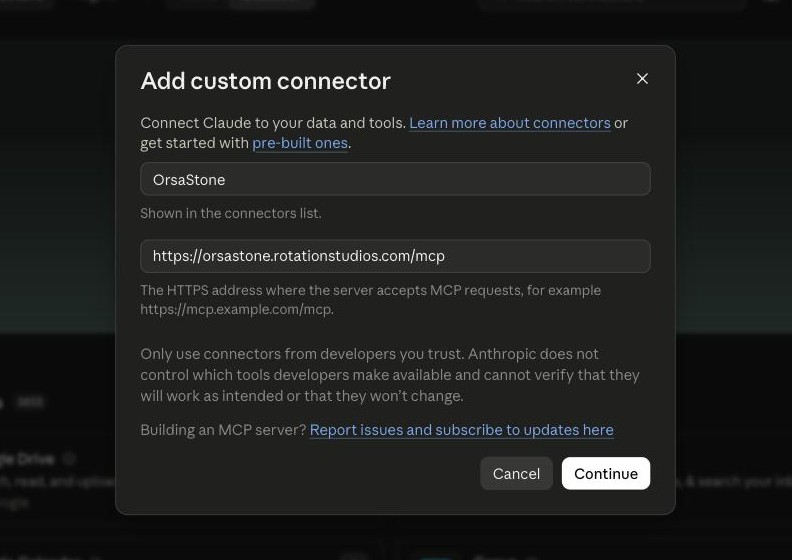
Add OrsaStone. In Claude, open Customize, choose Add custom connector, and paste OrsaStone’s address.
-
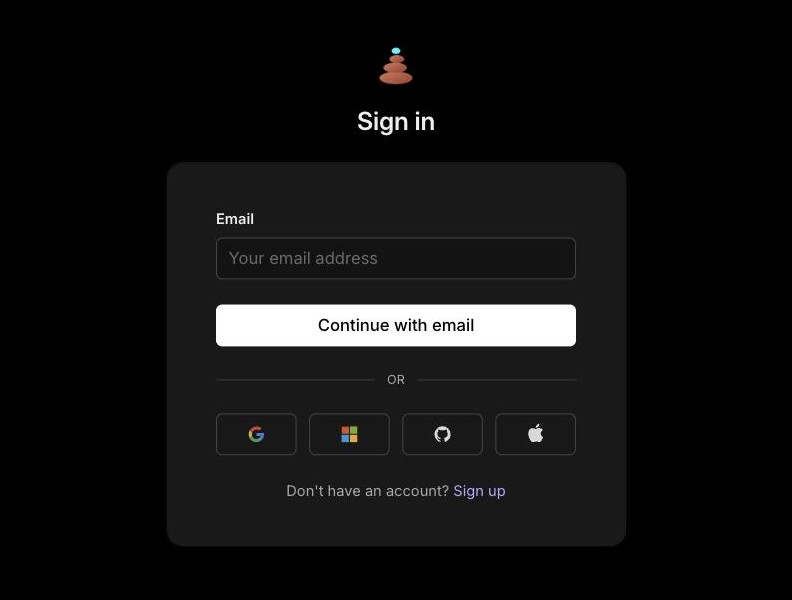
Sign in. Connect, then sign in with your email, or with Google, Microsoft, GitHub or Apple.
-
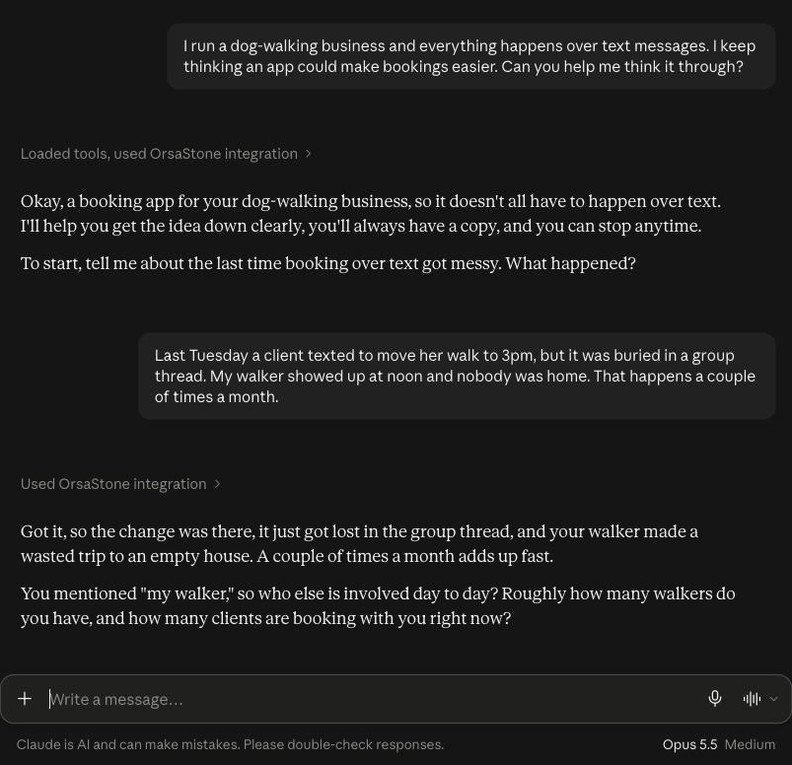
Start with the problem. Describe it the way you’d tell a friend.
-
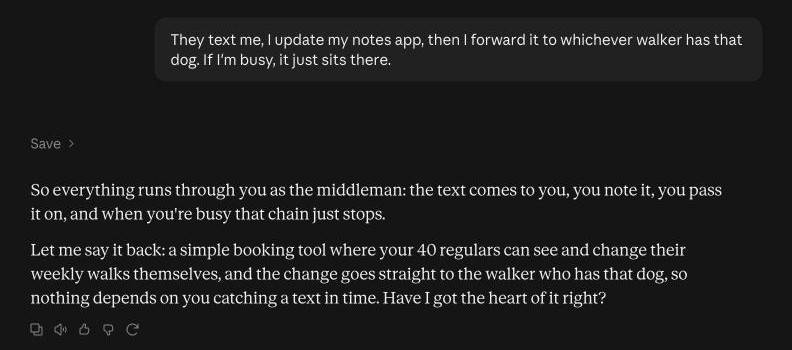
Check it understood. OrsaStone saves as you talk and plays the idea back in plain words.
-
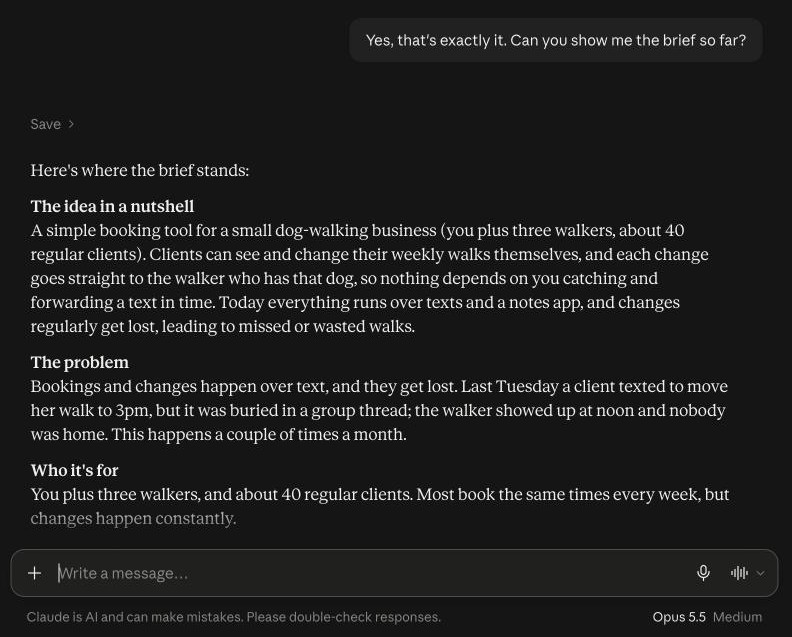
See your brief. Ask for it any time. It’s still there next conversation.
A real OrsaStone conversation in Claude, using an illustrative example. OrsaStone works the same way in ChatGPT.
What you end up with
A real project brief, written in your words.
Every conversation adds to one document. By the time you’re done, your idea is down on paper the way a developer needs it: the problem, the people it’s for, how the app should work, and what belongs in a first version.
Next to the brief, OrsaStone keeps a running record of the decisions you’ve made and the questions still open, so nothing gets lost between conversations.
When it reads right, you sign it off. You can export a copy at any time, and reopen it whenever your thinking moves on.
- The idea in a nutshell
- The problem
- Who it’s for
- How it works today
- How it will work
- What it must do
- Not doing
- Constraints
- Budget, timing and decisions
- Success
Plus decisions, open questions and notes
From brief to a working app, without starting over.
Most ideas stall at the hand-off: you explain everything again to someone new, and details slip. With OrsaStone, Rotation Studios already has your brief. We can take it from there and turn the idea into reality.
Design and build
Your brief becomes the plan for a mobile or web app. We agree scope, cost and timeline with you before any work starts.
Launch and hosting
We publish to the App Store and Google Play, and host and run the servers behind your app, so you don’t need a technical team.
Keep improving
Once people are using it, bring back what you learn. New requests go into the same OrsaStone project, next to the brief we built from.
Built by Rotation Studios
A conversation with a path to a real app.
Rotation Studios builds and runs mobile and web apps for founders and businesses. OrsaStone gives us a shared working brief: your idea, in your words, with the important details kept together.
As we discuss the project, you can respond to our notes, raise questions, and refine your priorities.
If we decide to work together, we’ll agree on scope, cost, and timeline directly. Changes to the brief give us something to discuss; development commitments are agreed together.
See our client workBefore you start
Do I need to know how to build an app?
No. Bring what you know about the problem and the people who have it. We can work through the technical choices later.
Where do I use OrsaStone?
Inside the assistant you already use. OrsaStone works in both Claude and ChatGPT. To add it to Claude:
- In Claude, open Customize, then Connectors.
- Choose Add, then Add custom connector. Name it OrsaStone and paste this address:
https://orsastone.rotationstudios.com/mcp - Select Connect and sign in with your email.
- Start a new chat and tell Claude about your idea. If OrsaStone doesn’t join in, turn it on from the + menu under Connectors.
Using ChatGPT, or stuck on a step? Ask us and we’ll walk you through it.
What does it cost?
OrsaStone is free to use for now. Any app development is discussed and agreed separately with Rotation Studios.
Do I have to finish my brief in one sitting?
No. Start with a few thoughts and come back when you have more. You can review your brief, revise it, and export a copy.
What if my idea changes?
That’s part of the process. Return to your project, explain what you’ve learned, and revise the brief. Even a finalized brief can be reopened. For a project already in development, changes become a conversation with us about scope and next steps.
Will OrsaStone build my app or give me a quote?
OrsaStone helps you develop and organize the brief. Rotation Studios works with you on feasibility, scope, pricing, and a development plan.
Why the name OrsaStone?
Every app is built on a first stone: a clear idea of what it should be. OrsaStone is where that stone gets laid. The name comes from orsa, Latin for “things begun”, and from Orsa sandstone, a Swedish building stone formed millions of years ago when a meteorite struck the land.
Questions about OrsaStone?
Ask about setting it up, how it works, or turning your brief into an app. We read every message.